
We provide insights into production plants and processes
DeveloperSenses has the same technical basis as the EdgeSenses and ProductionSenses systems since Generation C.
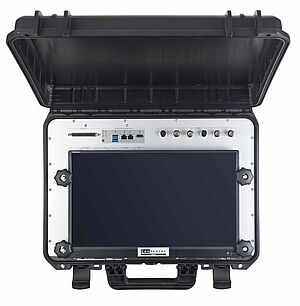
The hardware is installed in a robust plastic case that integrates all the necessary system components for short-term measurements. The electrical connections are the same as those of EdgeSenses and ProductionSenses. An existing touch panel can be used for operation or a matching 13" touchpad can be supplied as an additional accessory.
Function of the DeveloperSenses mobile measuring system
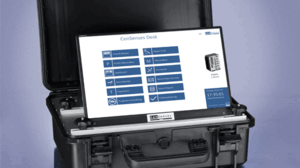
DeveloperSenses is equipped with the complete MDS device edition, so that mechanical variables such as force, pressure, acceleration, position can be recorded fully automatically in real time. As with all ConSenses systems, a particular strength is the reliable calculation of combined quantities, which can be used to quantify tilting or off-center forces.
DeveloperSenses adds the handy transport packaging, which also integrates a location for touch panels. This allows concrete questions to be dealt with quickly on the basis of fact-based data. This feature means that we like to use ProductionSenses for short-term measurements and always have rental systems available.
For longer measurements that are to be carried out in parallel to the usual system operation, the measuring case can of course also be annoying, in these cases we always recommend and use the slim EdgeSenses. From a data processing perspective, the two systems are equivalent.
With DeveloperSenses, an IT integration for instantiated data forwarding usually does not make any deeper sense. Rather, the data on the system is evaluated directly or afterwards at the workplace with the MDS WorkstationEdition.
Automatic reports can of course be used for large amounts of data in the same way as data export for further analysis in customer systems.
Advantages of the DeveloperSenses mobile measuring system
DeveloperSenses can enable development teams and maintenance staff to easily, quickly and reliably collect reliable data from plants. Go and See strategies get a significant boost because the available senses are systematically expanded to include force, acceleration and the finest path information. The empirical knowledge of employees is thus sharpened and argumentation becomes even more substantiated. Measures based on data-based argumentation can also be checked granularly with regard to effects and goal achievement.
Experience shows again and again that this approach is crucial for success, especially in the case of unknown error modes or new processes.
For the first applications, ConSenses is happy to support the pre-configuration of measurement setups as part of maintenance and support. Usually, we like to incorporate this service into our hands-on training. After a few deployments, the company- and application-specific sticking points crystallize and employees can collect and interpret data independently. Of course, we are happy to stay a phone call / mouse click away as part of maintenance and support and also provide remote support in tricky cases.
DeveloperSenses has the same scalability as the other ConSenses systems. PlugandPlayModules for the most common sensor types, expandable boxes and the synchronization of several systems such as other system families such as EdgeSenses are possible.
In practice, this sometimes means that if the data acquisition of an installed ES or PS is to be temporarily expanded, then a DS can also expand the available database on a test basis.
Integration and development of the DeveloperSenses mobile measuring system
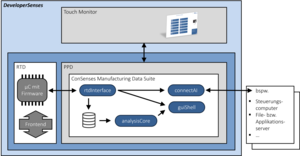
The illustration on the right visualizes the interaction of the essential components in DeveloperSenses. As with all ConSenses measuring systems, analogue and digital inputs and outputs are connected to the RealtimeDevice (RTD) via the front end. The rtdInteface of the ManufacturingDataSuite (MDS) controls the data acquisition and ensures synchronous and secure data transfer to the ParallelProcessingDevice (PPD). There, data is stored in the original format and evaluated with the analyticsCore. The connectAI module allows transactional processing and exchange with connected systems. Visualizations of the guiShell can be used via RemoteDesktop connections (RDP) or via the integrated HDMI port to configure the system or check the correct functionality.